ehsan-0801/TaskCanvas-Frontend
Publichttps://github.com/ehsan-0801/TaskCanvas-Frontend This repo is for frontend and https://github.com/ehsan-0801/TaskCanvas-Backend This repos is for backend backend api https://taskcanvas-backend-lgo8.onrender.com/
TaskCanvas — Frontend
This is the web app for TaskCanvas — the thing people actually click on. It's a Next.js (App Router) project in TypeScript that talks to the Django API. Two main areas: a team-based Kanban board, and an image annotation tool.
Live app: https://task-canvas-annotate.vercel.app Live API: https://taskcanvas-backend-lgo8.onrender.com
Backend repo: https://github.com/ehsan-0801/TaskCanvas-Backend
What you can do in it
You sign up (or log in) and land on your task board. From there:
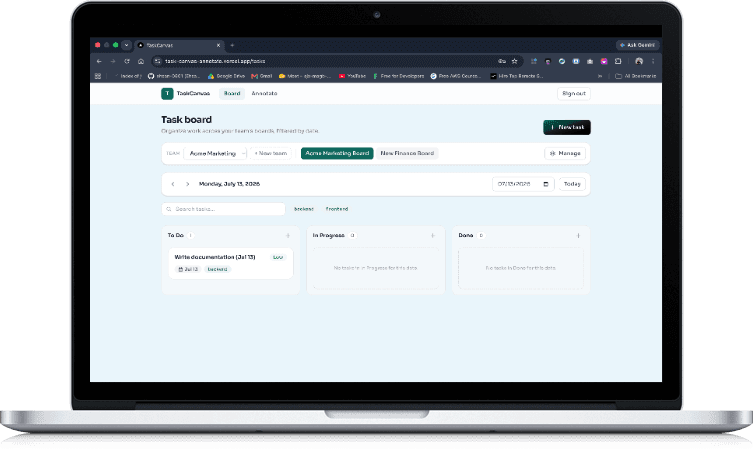
- You pick a team and one of its boards from the bar at the top. If you own the team there's a Manage button, which is where you create boards, add people to the team by email and password, and choose which boards each person can see.
- The board itself is the usual three columns — To Do, In Progress, Done. You add and edit tasks in a modal, drag cards between columns, filter by text or tag, and everything's scoped to the date you've selected.
- The annotation tool is the other half of the app, and it's grown a fair bit — see below.
Members only see the boards they've been granted, and only owners see the Manage controls, so what shows up depends on who you're logged in as.
The annotation tool
Upload some images, scroll the thumbnail strip, and draw on them.
You can draw a polygon point by point, or drag out a rectangle, square, triangle or circle. Everything is stored as a list of points (a circle is just a smooth many-sided one), which means every shape behaves the same afterwards: you can resize it from its bounding-box handles, drag it around, or switch on "Edit points" to move individual vertices, insert a new one mid-edge, or delete one.
Shapes carry a label drawn on the image itself. Double-click to rename it inline, and drag the label chip wherever you want it — the position sticks, and it moves and scales with its shape if you move or resize that shape. You can reset it back to auto-centred whenever.
Beyond that: multi-select with shift-click (then delete, duplicate or recolour the lot at once), copy shapes onto another image, any colour you like rather than just the presets, zoom and pan, sliders for shape opacity and for image brightness and contrast, and undo/redo with Ctrl+Z and Ctrl+Y.
Most things have a keyboard shortcut (V select, D polygon, R rectangle, S square,
T triangle, C circle, E edit points, H hide, Enter rename, Del delete, arrows to
nudge, [ and ] to change image), and right-clicking the canvas, a shape or a
vertex gives you a context menu for the rest.
What it's built with
Next.js 16 and TypeScript (strict, no JavaScript files). Tailwind for styling.
Zustand holds the small bits of shared state — the selected date and the current
team/board. Drag-and-drop is @dnd-kit, the annotation canvas is react-konva,
forms use react-hook-form with zod, and API calls go through a single axios
instance that attaches the JWT and quietly refreshes it when it expires.
Developed on Node 22 and npm 10.
Running it locally
Start the backend first — the frontend is useless without it, and it expects the
API at http://127.0.0.1:8000 by default.
cd frontend
npm install
cp .env.example .env.local         # set NEXT_PUBLIC_API_URL to your backend
npm run dev                        # http://localhost:3000
The only environment variable is NEXT_PUBLIC_API_URL, the base URL of the Django
backend.
Open http://localhost:3000 and sign in. If you ran the backend seed, the demo
owner is demo@example.com / demo12345, and any of the seeded members (for
example alice@example.com) uses member12345 — log in as a member to see the
narrower, access-limited view.
Other scripts: npm run build for a production build, npm run start to serve it,
npm run lint for eslint.
The pages
| Route | Who | What |
|---|---|---|
/login | public | Email + password sign in |
/register | public | Create an account and your own workspace |
/tasks | signed in | Teams, boards and the Kanban board |
/annotate | signed in | Image upload and polygon annotation |
Anything behind a sign-in redirects to /login if there's no valid session, and
/login and /register bounce you to the board if you're already in.
Deploying to Vercel
Import the repo, set NEXT_PUBLIC_API_URL to the deployed backend URL, and add the
Vercel domain to CORS_ALLOWED_ORIGINS on the backend so the browser is allowed to
call it. That's it — Vercel detects Next.js on its own.
Difficulties faced and how I solved them
The annotation canvas caused the most head-scratching. Polygons are stored as
normalized 0–1 coordinates so a shape drawn at one size still lands correctly at
another, which was fine until I added zoom and pan — suddenly the raw pointer
position no longer matched image space and vertices dropped in the wrong place. The
fix was to read the cursor with Konva's getRelativePointerPosition(), which
already undoes the stage's scale and offset, so all the polygon maths stays in the
image's own coordinate space no matter how far you've zoomed. Handle and stroke
sizes get divided by the zoom so they stay a constant size on screen. It also can't
render on the server (there's no canvas there), so it loads through next/dynamic
with SSR turned off.
Undo/redo turned out to be sneakier than it looks, because the shapes live on a server rather than only in memory. Undoing a delete means recreating the shape, and the backend hands the new row a new id. So the entries still sitting in the history stack — a rename, a recolour — were pointing at an id that no longer existed, and the next undo would 404. The fix was to remap the old id to the new one across both stacks (and the current selection) every time a shape gets recreated. I also scoped the history per image and left "copy to another image" out of it, so an undo can never quietly change a picture you're not looking at.
Auth had two fiddly bits. The axios interceptors run outside React, but the tokens live in React state, so there's a little "bridge" — the auth context registers getters and setters that the interceptors read, which keeps the tokens out of module-level globals. And when a burst of requests all hit a 401 at once, each one used to try refreshing the token separately; now a single in-flight refresh promise is shared, the original requests replay once, and only a genuinely failed refresh sends you back to login.
Making the board feel quick meant doing things optimistically — creating, editing, deleting and dragging all update the screen immediately and roll back if the server disagrees. Task creation drops in a temporary card and swaps it for the real one once the id comes back, and deleting shows an Undo in the toast that recreates the task. Dragging was the tricky case: reorder writes each card's position from its index in the column, so if you dragged while a search or tag filter was active you'd renumber only the visible cards and quietly break the order of the hidden ones. So drag-and-drop just switches off while a filter is on — reordering only ever runs against the full, unfiltered list.
The selected date lives in its own Zustand store rather than inside the board,
which keeps the <DateSelector/> a plain presentational component with no task
logic in it. When teams came along I did the same thing for the current team and
board, so switching either one re-derives cleanly without tangling state together.