ehsan-0801/NexEstate
PublicNexEstate is a Real Estate platform for selling and renting houses, villa, hotel etc
NexEstate Connect - Real Estate Mediation Platform
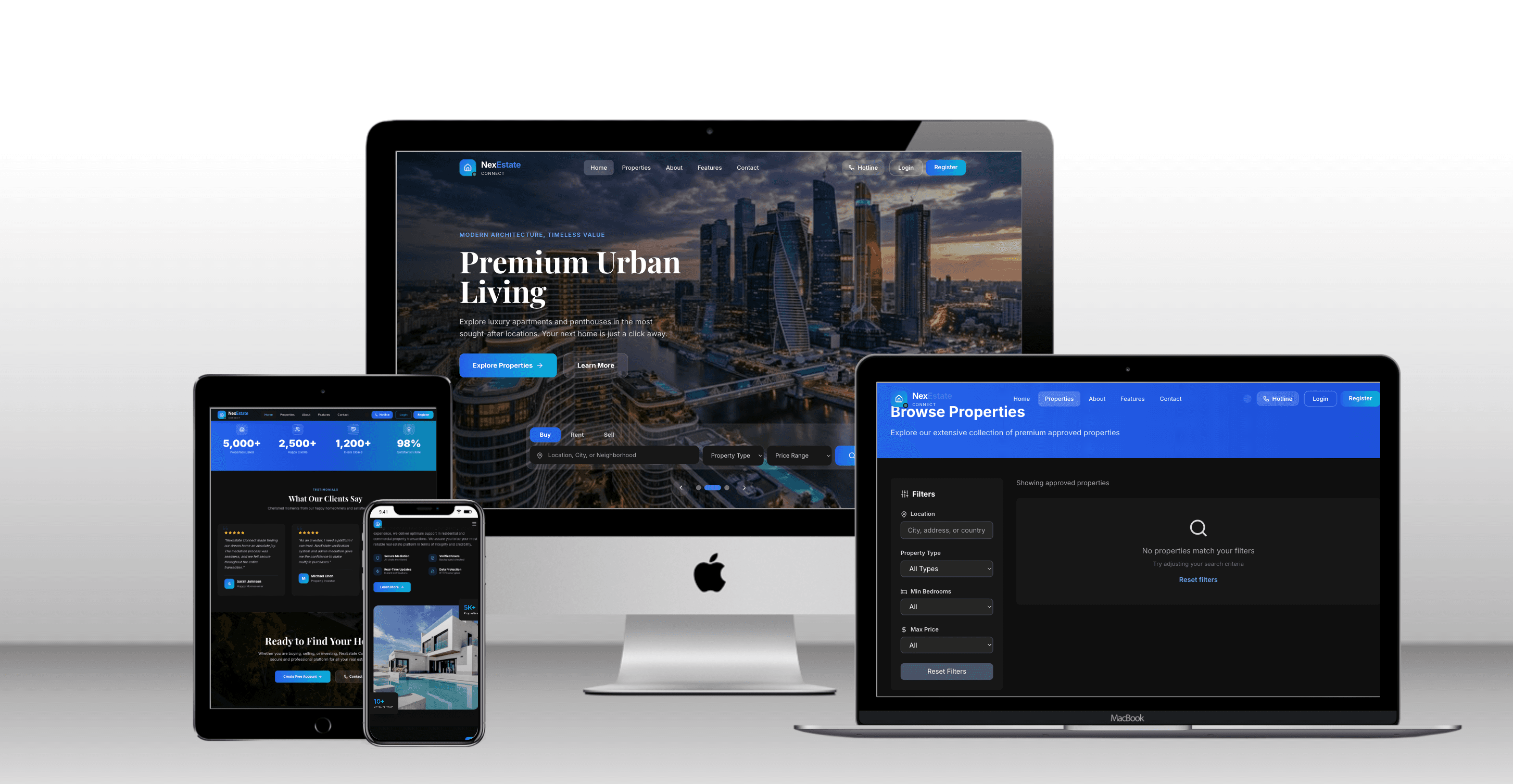
A modern, responsive real estate platform built with Next.js 16, React 19, DaisyUI, and Tailwind CSS. The application features role-based dashboards for Admin, Seller, Buyer, and Agent users with a beautiful public-facing website.
🌟 Features
Public Pages
- Home Page - Landing page with featured properties, how it works section, and call-to-action
- Properties Listing - Advanced search and filtering for properties with pagination
- Property Details - Comprehensive property information with image gallery and agent contact
- About Page - Company mission, values, team, and statistics
- Authentication - Login and registration pages with demo credentials
Role-Based Dashboards
Admin Dashboard
- Overview statistics (Users, Listings, Revenue, Transactions)
- Recent activities monitoring
- User management table
- Quick stats with progress indicators
Seller Dashboard
- Property management with editing and deletion
- Views and inquiries tracking
- Message management from interested buyers
- List new property button
- Analytics overview
Buyer Dashboard
- Saved favorite properties
- Active offers tracking with status
- Message management with sellers
- Budget limit and property preferences
- Make offer functionality
Agent Dashboard
- Client management with contact information
- Upcoming property showings
- Earning statistics
- Client relationship tracking
- Schedule new showing feature
🛠️ Tech Stack
- Framework: Next.js 16 (App Router)
- UI Library: React 19
- CSS Framework: Tailwind CSS + DaisyUI 4
- Icons: Lucide React
- Styling: JSX with DaisyUI components
- State Management: React Hooks (useState, useEffect)
- Routing: Next.js App Router
- Storage: localStorage for demo authentication
📁 Project Structure
app/
├── layout.jsx                    # Root layout
├── globals.css                   # Global styles
├── page.jsx                      # Home page
├── login/page.jsx               # Login page
├── register/page.jsx            # Registration page
├── about/page.jsx               # About page
├── properties/page.jsx          # Properties listing
├── property/[id]/page.jsx       # Property details
├── admin/dashboard/page.jsx     # Admin dashboard
├── seller/dashboard/page.jsx    # Seller dashboard
├── buyer/dashboard/page.jsx     # Buyer dashboard
└── agent/dashboard/page.jsx     # Agent dashboard

tailwind.config.js              # Tailwind configuration with DaisyUI
package.json                    # Dependencies
🚀 Getting Started
Installation
- Install dependencies:
npm install
# or
pnpm install
- Run development server:
npm run dev
# or
pnpm dev
- Open in browser:
Navigate to
http://localhost:3000
🔐 Demo Credentials
The application uses localStorage for demo purposes. Use these credentials to test different roles:
| Role | Password | |
|---|---|---|
| Admin | admin@nexestate.com | admin123 |
| Seller | seller@nexestate.com | seller123 |
| Buyer | buyer@nexestate.com | buyer123 |
| Agent | agent@nexestate.com | agent123 |
🎨 Design Features
Color Scheme
- Primary: Blue (#2563eb) - Main brand color
- Secondary: Green (#16a34a) - Accent color
- Accent: Amber (#f59e0b) - Highlights
- Neutral: Grayscale - Text and borders
Responsive Design
- Mobile-first approach
- Tailored layouts for different screen sizes
- Hamburger menu for mobile navigation on dashboards
- Adaptive grid layouts
Modern UI Elements
- Glassmorphism effects
- Smooth transitions
- Hover states
- Interactive modals
- Progress bars
- Badge indicators
- Card-based layouts
📱 Pages Overview
Public Pages
- Home (
/) - Marketing homepage with property showcase - Properties (
/properties) - Searchable property listings with filters - Property Detail (
/property/[id]) - Full property information - About (
/about) - Company information - Login (
/login) - Authentication page - Register (
/register) - User registration
Protected Pages (Dashboards)
- Admin Dashboard (
/admin/dashboard) - System overview and user management - Seller Dashboard (
/seller/dashboard) - Property management - Buyer Dashboard (
/buyer/dashboard) - Saved properties and offers - Agent Dashboard (
/agent/dashboard) - Client and showing management
🎯 Features Breakdown
Admin Dashboard
- Real-time statistics
- User activity monitoring
- User management with roles
- Revenue tracking
- Transaction management
Seller Dashboard
- List and manage properties
- Track views and inquiries
- Message management
- Property performance analytics
Buyer Dashboard
- Save favorite properties
- Make offers on properties
- Track offer status
- Manage buyer preferences
- Message sellers
Agent Dashboard
- Client relationship management
- Schedule and manage showings
- Track sales and earnings
- Client communication
🔄 State Management
The application uses React Hooks for state management:
useState- Component stateuseEffect- Side effects and user authentication checkuseRouter- Navigation and redirects
🎨 DaisyUI Components Used
- Cards
- Buttons
- Forms (input, select, textarea)
- Tables
- Modals/Dialogs
- Badges
- Progress bars
- Navbars
- Footers
- Avatars
- Dropdowns
- Dividers
- Alerts
- Radios
- Checkboxes
🔒 Security Notes
This is a frontend-only demo application. For production use:
- Implement proper backend authentication
- Use secure password hashing
- Implement JWT or session-based auth
- Add CORS and CSRF protection
- Validate all inputs server-side
- Use HTTPS in production
- Implement proper authorization checks
📊 Dummy Data
The application includes realistic dummy data for:
- Property listings with images and details
- User information
- Transaction records
- Messages and communications
- Agent information and client lists
🎯 Next Steps for Production
-
Backend Integration
- Connect to real database (PostgreSQL, MongoDB, etc.)
- Implement proper authentication system
- Create API endpoints
-
Enhancement
- Add real image uploads
- Implement live chat
- Add video tours
- Email notifications
- Payment integration
-
Testing
- Unit tests
- Integration tests
- E2E tests
-
Deployment
- Deploy to Vercel
- Set up CI/CD pipeline
- Configure environment variables
📄 License
This project is created for demonstration purposes.
🤝 Support
For questions or issues, please refer to the documentation or contact support.
Built with ❤️ using Next.js, React, and DaisyUI