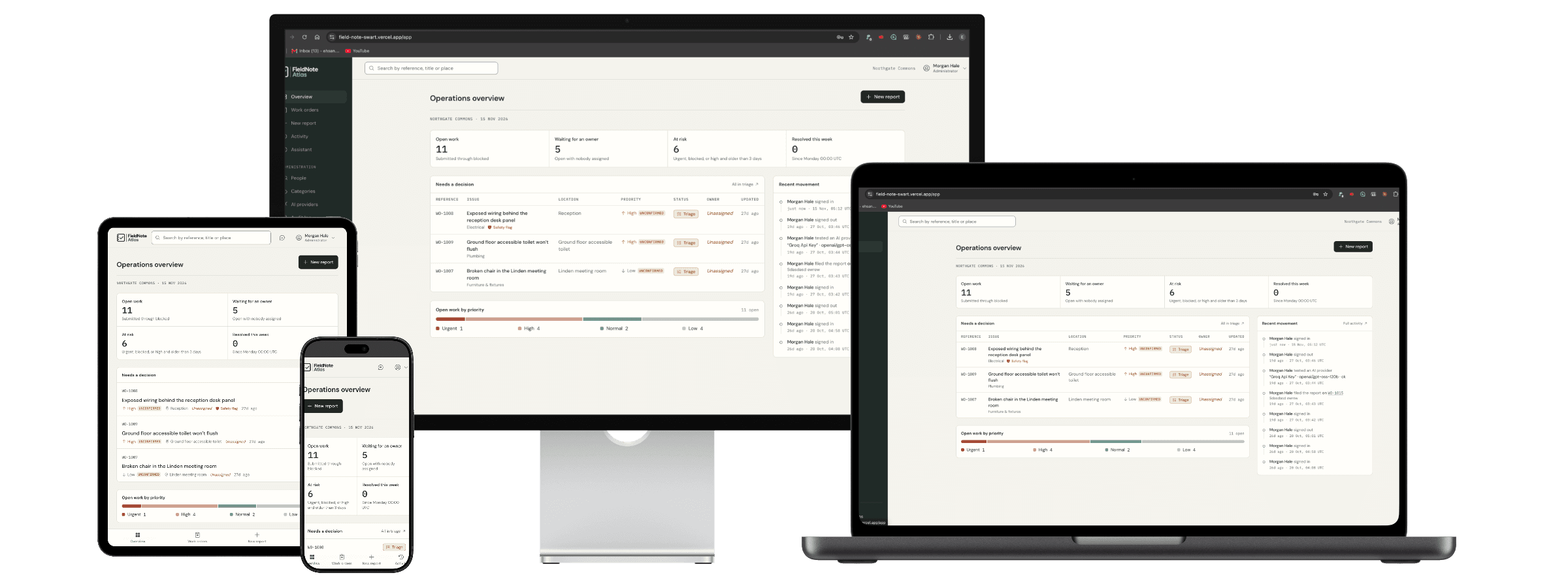
ehsan-0801/FieldNote
Public**Fieldnote Atlas** is an AI-powered facility management system that transforms issue reports into trackable work orders, enabling teams to manage, assign, prioritize, and resolve maintenance tasks with role-based access and audit tracking.
Fieldnote Atlas
Issue intake and work-order tracking for small facilities teams: studios, co-working spaces, campus buildings, community venues. A reporter writes a rough note; it is saved verbatim, optionally drafted into structure, reviewed by a person, triaged, assigned, worked and resolved, with every decision kept in an append-only timeline.
Live demo: field-note-swart.vercel.app
- Stack: Next.js 16 (App Router, Cache Components), React 19, TypeScript (strict), Tailwind CSS 4, Prisma 7 + PostgreSQL, Zod 4,
@phosphor-icons/react, Vitest, Playwright. - AI is optional. Paste an API key from almost any provider (Gemini, Claude, OpenAI, Groq, OpenRouter, Mistral, DeepSeek and more) on the admin page and it is detected, checked and used. Without a key, or when the provider fails, a clearly labelled rule-based draft is used and everything else works the same.
At a glance
| What | Details |
|---|---|
| Purpose | Turn rough issue reports into tracked work orders: report, review, triage, assign, fix, close |
| Roles | Reporter, Technician, Coordinator, Admin; each sees only what their role allows |
| Main pages | Dashboard (/app), work orders, new report, assistant (/app/assistant), admin (people, categories, AI providers, audit) |
| AI features | Drafting a report into structure, plus a chat assistant that can look up workspace data and suggest changes you confirm |
| Data | PostgreSQL via Prisma; every change is written to an append-only audit log |
| Security | Server-side sessions, role checks on every API route, rate limits, CSP, encrypted AI keys |
| Runs on | Any Node 22 host; built for Vercel + Neon |
| Live demo | field-note-swart.vercel.app |
Quick start
Requirements: Node 22+, pnpm 12 (pinned in package.json), a PostgreSQL database (a Neon project works well).
pnpm install                 # also runs `prisma generate`
cp .env.example .env.local   # fill in DATABASE_URL, DATABASE_URL_UNPOOLED, SESSION_SECRET
pnpm db:migrate              # apply migrations (uses DATABASE_URL_UNPOOLED)
pnpm db:seed                 # demo workspace and accounts (development only)
pnpm dev                     # http://localhost:3000
Generate a session secret with openssl rand -base64 48.
Demo accounts
| Role | Password | |
|---|---|---|
| Admin | admin@fieldnote.com | password123 |
| Coordinator | priya@northgate.test | password123 |
| Technician | tomas@northgate.test | password123 |
| Technician | hana@northgate.test | password123 |
| Reporter | jordan@northgate.test | password123 |
| Reporter | sam@northgate.test | password123 |
A second workspace (“Harbor Studio Collective”, ade@harbor.test) exists to demonstrate workspace isolation. All people, places
and reports are fictional. Passwords are stored only as bcrypt hashes. The seed refuses to create these accounts when
NODE_ENV=production (see Production seed).
All of these accounts work on the live demo. The seed script (prisma/seed.ts) is kept
out of the repository, so pnpm db:seed only works from a working copy that has it.
Scripts
| Command | What it does |
|---|---|
pnpm dev / build / start | Next.js development server, production build, production server |
pnpm lint / typecheck | ESLint (Next.js config) and tsc --noEmit |
pnpm format / format:check | Prettier |
pnpm test:unit | Domain, policy, validation and AI-handling tests (no database) |
pnpm test:integration | Services and route handlers against a real Postgres schema |
pnpm test:e2e | Playwright: full reporter → coordinator → technician flow in Chrome |
pnpm db:migrate / db:seed | prisma migrate deploy / seed |
pnpm eval:ai | Smoke-test evaluation of report extraction (see AI) |
Tests and the test schema
The test suites (tests/: unit, integration, end-to-end and the AI evaluation fixture) are kept in the maintainers' working copy
and are not published in this repository. The test:* and eval:ai scripts and the Vitest/Playwright configs expect that folder.
Integration and end-to-end tests never touch your data. They run in a dedicated Postgres schema on the same database,
named by TEST_DATABASE_SCHEMA (default fieldnote_test; public is refused). Setup applies migrations to that schema and
empties it between runs. Run the two suites one after the other, not at the same time.
pnpm test:e2e needs a production build (pnpm build) and uses the installed Google Chrome. To use Playwright’s own
Chromium instead: pnpm exec playwright install chromium and run with PLAYWRIGHT_CHANNEL="".
How it is organised
prisma/                schema, migrations, seed
src/domain/            pure rules shared by server and client: workflow, access policy, priority, Zod schemas
src/server/            server-only: db, auth/sessions, rate limiting, audit, work-order services, AI, admin
src/app/api/**         thin route handlers: parse → call a service → JSON envelope
src/app/app/**         authenticated pages (server components call services directly)
src/components/        UI: shell, work-order screens, admin, shared states
tests/                 test suites and AI evaluation fixture (local only, not in the repository)
Business rules live once, in src/domain and src/server. Route handlers and pages both call the same service functions.
Access model
Every request resolves the session on the server, rejects inactive users and takes the workspace from the session, never from
the request. Each work order is checked with relationTo(actor, workOrder), which combines role and ownership:
| Relation | Who | Can |
|---|---|---|
manager | admin or coordinator in the same workspace | everything: edit, confirm priority, assign, all legal transitions |
assignee | the technician currently assigned | correct summary/location/asset, progress notes, work transitions |
reporter | whoever filed it | edit and send their own draft until triage, comment, follow its status |
Anything else returns the same 404 NOT_FOUND, whether the record exists, belongs to someone else or is in another workspace.
Request bodies are strict Zod objects: authority-bearing keys such as role, workspaceId or reporterId are rejected, not ignored.
User and category management and the full audit log are admin-only. Coordinators see work-order history; technicians and reporters
see the history of the work orders they can open.
Other protections: bcrypt (cost 12) password hashes; database-backed sessions whose cookie holds only a random token (stored as
SHA-256), HttpOnly, SameSite=Lax, Secure and __Host- prefixed in production; sessions rotated on sign-in and revoked on role
change, deactivation or password reset; Origin check on every state-changing request (against APP_ORIGIN when set); 32 KB body
limit enforced while streaming; Postgres-backed rate limits for sign-in (per IP, and per account counting failed attempts only), AI
drafting, the assistant and mutations; the demo passwords are refused at sign-in in production; security headers (CSP,
frame-ancestors 'none', nosniff, referrer policy, HSTS in production); audit rows written in the same transaction as the change
they describe; error responses, including unknown API paths, carry a stable code and request ID, never stack traces or database
messages.
Workflow
SUBMITTED → TRIAGE → READY → IN_PROGRESS ⇄ BLOCKED
                 └──────────→ IN_PROGRESS → RESOLVED → CLOSED
                                     ↑_________|  (reopen, managers, with reason)
any status except IN_PROGRESS / ARCHIVED → ARCHIVED (managers, with reason)
Illegal moves return 409 INVALID_TRANSITION. Resolving requires a resolution note; blocking, reopening and archiving require a
reason; READY and IN_PROGRESS require an owner, and work that loses its owner while READY, IN_PROGRESS or BLOCKED goes back
to TRIAGE (unassigned by a coordinator, or the technician deactivated or moved to another role). Status changes and edits are
conditional on the status that was checked, so a concurrent change can't be overwritten.
Priority
Priority is the sum of confirmed factors: possible safety risk +5, essential service unavailable +4, multiple people affected +3, getting worse +2. Bands: 0–1 Low, 2–3 Normal, 4–6 High, 7+ Urgent. Reporters may propose factors while reviewing their draft; priority shows as unconfirmed until a coordinator confirms it. The rationale is written out and never presented as a safety assessment.
AI drafting
POST /api/ai/parse-report drafts a title, summary, category, impact signals (each with a quote from the report), missing details
and a next step for a report that is already saved. The model only sees the report text with emails and phone numbers removed,
plus category names. Its output is validated with a strict schema; categories must exist in the workspace and every evidence quote
must appear in the report, or it is dropped. Nothing is written to the work order until a person saves the review form.
| Variable | Default | Notes |
|---|---|---|
AI_PROVIDER | gemini | gemini, groq or none |
GEMINI_API_KEY | (empty) | from Google AI Studio |
GEMINI_MODEL | gemini-flash-latest | any model that supports generateContent with a response schema |
GROQ_API_KEY | (empty) | from the Groq console |
GROQ_MODEL | openai/gpt-oss-20b | must support strict json_schema output |
AI_TIMEOUT_MS | 8000 | per attempt; one retry on timeouts and 5xx, none on 429 |
AI_KEYS_SECRET | (empty) | 32+ characters; encrypts keys saved on the AI providers page |
Free tiers, quotas and data-use terms change. Check them before deploying: Gemini’s free tier may use submitted content to improve
Google’s products, so prefer Groq or a paid tier if reports may contain sensitive details. Every run is stored (AiExtraction) with
provider, model, schema version, status, latency and error code. Raw report text is not logged.
AI providers (admin)
Administrators can manage provider settings at AI providers (/app/admin/ai) instead of only through environment variables.
A workspace can save several configurations (label, provider, model, key and, for OpenAI-compatible services, a base URL) and
make at most one of them active.
- Which source applies.
AI_PROVIDER=noneturns AI off everywhere, whatever is saved. Otherwise the workspace's active configuration is used for both report drafting and the assistant. With none active (or after the active one is deleted, or after Use environment default), the environment variables above apply as before. The page shows which source is in effect. - Adding a provider needs only the key. Paste it and the form recognises the service from the key's prefix (
AIza…Gemini,sk-ant-…Claude,gsk_…Groq,sk-or-…OpenRouter,xai-…xAI,sk-proj-…/sk-…OpenAI,nvapi-…NVIDIA,hf_…Hugging Face, and others). Keys without a recognisable prefix (Mistral, DeepSeek) need the service picked from the list. The key is never sent to a service the administrator didn't choose. - Services. Google Gemini, Anthropic Claude, Groq, OpenAI, OpenRouter, xAI, DeepSeek, Mistral, Together AI, Fireworks,
Cerebras, NVIDIA NIM, Hugging Face, or Other (OpenAI-compatible) with your own base URL (for example a local Ollama at
http://localhost:11434/v1, development only). Base URLs must behttps://, or plainhttp://to localhost, with no credentials or query string. - Model. Optional. Left blank, the server reads the provider's own model list, skips non-chat models (embeddings, speech, images) and picks the service's recommended model, or the first available one. Find models fills a suggestion list.
- Any model works. Strict JSON-schema output is requested first; a model that refuses it is retried with JSON mode, then a
plain prompt carrying the schema, and the reply is validated the same way in every case. The shape that worked is remembered
per model. Claude uses the official
@anthropic-ai/sdkwith structured outputs, low effort and server-side refusal fallback on the models that support it. - Checked before saving. Adding a provider sends one short test prompt. A rejected key, unknown model or unreachable service is reported on the form and nothing is saved. With Use it once it connects ticked (the default), it becomes active at once.
- Keys. Encrypted with AES-256-GCM before they are stored, bound to the workspace, and never returned by any API or rendered: only the last four characters are shown. Editing a configuration without entering a key keeps the stored one; changing the service requires a new key.
- Test connection sends one tiny prompt through the same adapter with a 15-second timeout and reports a fixed result code
(for example
KEY_REJECTEDorMODEL_OR_URL_NOT_FOUND), never the provider's own message. Adding a provider, finding models and testing share a limit of 20 per administrator per 10 minutes. - Audit. Creating, editing, deleting, activating, switching to the environment default and testing are all audited. Audit details record the label, model and what changed, never the key.
Encryption secret. Set AI_KEYS_SECRET (32+ random characters, e.g. openssl rand -base64 48). If it is not set, the
encryption key is derived from SESSION_SECRET with HKDF under a separate label, so the two secrets never produce the same key.
That fallback is convenient but couples two concerns: rotating SESSION_SECRET then makes every saved provider key unreadable.
Changing AI_KEYS_SECRET has the same effect. An active configuration whose key can't be decrypted is not silently replaced
by the environment provider; drafting uses the rule-based fallback, the assistant is unavailable, and the page asks an
administrator to enter the key again.
Assistant
/app/assistant is a general-purpose chat assistant that uses the same provider and key. It can answer anything. For workspace
questions it is told to look the answer up first and answer only from what the lookups return, saying plainly when the data doesn't
show it. The read-only lookups are:
search_work_ordersandget_work_order: search the list, or open one work order by reference.get_overview: open, unassigned, at-risk and recently resolved counts.list_technicians: assignable technicians and their open work (coordinators and administrators only).list_categories: active categories with open counts, counted over the work the person can see.recent_activity: the last 20 events from the person's activity stream.workload: open work by status and by owner: the whole workspace for coordinators and administrators, the technician's own queue, or a reporter's own reports.my_work_orders: work assigned to the person and work they reported, optionally filtered by status.
These run on the server through the same scoped services as the UI, so the model only ever receives data the signed-in person can already see, with contact details removed.
- Suggest, then confirm. The assistant can suggest assigning a technician, changing status, adding a note or filing a new report. The server checks each suggestion against the person’s permissions and the workflow rules before offering it, and runs it only when they click Confirm, through the normal services with their usual audit entries. A suggestion can be confirmed once.
- Private history. Conversations are saved per user and visible only to their owner, who can delete them. Actions confirmed from a chat stay on the work orders and in the audit log.
- Bounded. At most five model calls per message, each with a timeout of
AI_TIMEOUT_MSor 15 seconds (whichever is longer), 45 seconds for the whole turn, a strict reply format, and a limit of 30 messages per 10 minutes per person. - Without a key the page explains that the assistant is unavailable; everything else works as before.
This is a deliberate change from the original brief, which ruled out a chat-first interface. Report intake itself still uses the structured review form.
Evaluation
pnpm eval:ai runs the 20 hand-written cases in tests/fixtures/extraction-cases.json through whichever source is configured.
This is a smoke test of behaviour, not an accuracy measurement.
Last recorded run, rule-based fallback only (no provider key was configured): category match 18/20, priority band agreement
14/20, fallback used 20/20 (NO_KEY). The misses are phrasings the keyword rules don’t cover (“sparked”, “slip risk”,
“lost power”). No model has been evaluated yet. Run the script with a key to measure one.
Deploying to Vercel with Neon
- Create a Neon project and copy both connection strings: pooled (
-poolerhost) for the app, direct for migrations. - Import the repository in Vercel and set the environment variables (Production and Preview):
DATABASE_URL(pooled),DATABASE_URL_UNPOOLED(direct),SESSION_SECRET,APP_ORIGIN(your site's origin, e.g.https://fieldnote.example.org; comma-separate several), and optionallyAI_PROVIDERwithGEMINI_API_KEYorGROQ_API_KEY. Never useNEXT_PUBLIC_for any of these. - Apply migrations from a trusted machine or CI before each deploy that changes the schema:
DATABASE_URL_UNPOOLED=… pnpm db:migrate. - Create the first administrator with the production seed.
- Deploy. The build runs
prisma generate; nothing at runtime depends on local files or in-memory state.
Production seed
NODE_ENV=production ADMIN_EMAIL=ops@example.org ADMIN_PASSWORD='a long unique passphrase' \
WORKSPACE_NAME="Your organisation" DATABASE_URL_UNPOOLED=… pnpm db:seed
It creates the workspace, default categories and one administrator, and no demo data. It refuses admin@fieldnote.com, passwords under 12
characters and the known demo passwords.
Production checklist
-
DATABASE_URLis the pooled URL;DATABASE_URL_UNPOOLEDis the direct URL; both usesslmode=verify-full. - The database role used at runtime can read and write the app tables but not create databases or roles.
-
SESSION_SECRETis unique to the environment and at least 32 random characters. -
NODE_ENV=production(Vercel sets this), so cookies areSecureand__Host-prefixed. -
APP_ORIGINlists the site's public origin(s), so the cross-site check doesn't depend on the request's Host header. -
pnpm db:migratehas run against the production database. - The demo seed has not been run in production; the administrator was created with non-default credentials.
- AI provider terms and quotas checked, or
AI_PROVIDER=none. -
AI_KEYS_SECRETis set (32+ random characters) if administrators will save AI provider keys in the app.
Rotating credentials
- A user’s password: an administrator uses Reset password on the People page to set a temporary password; the person is signed out everywhere and the reset is audited. There is no self-service reset or email link yet.
- Administrator: create a new admin with the production seed or the People page, sign in as them, then deactivate the old account.
SESSION_SECRET: replace it and redeploy. It keys IP hashes in audit rows and rate-limit buckets, so existing sessions remain valid. IfAI_KEYS_SECRETis unset it also protects saved AI provider keys (see below). To force everyone to sign in again, also clear theSessiontable.- Database password: rotate it in Neon, update both URLs in Vercel, redeploy.
- AI keys: revoke in the provider console, then either set the new key in the environment and redeploy, or edit the provider on the AI providers page and enter the new key (no redeploy needed).
AI_KEYS_SECRET(orSESSION_SECRETwhenAI_KEYS_SECRETis unset): keys saved on the AI providers page can't be decrypted after a change, so re-enter each one on that page after rotating.
Known limitations
- One workspace per user. Workspaces are enforced everywhere, but there is no workspace switcher or self-service sign-up.
- No self-service password reset, email notifications, attachments or CSV export yet.
- Rate limits are fixed windows in Postgres. Under bursts they can undercount slightly, and per-IP limits depend on the platform
setting
x-forwarded-for(Vercel does). - The rule-based fallback is deliberately simple keyword matching (see the evaluation above).
- Timestamps are shown in UTC.
Demo walkthrough
- Sign in as
jordan@northgate.test, choose New report and enter: “The hallway light near room 204 keeps flickering and smells burnt.” Choose Draft structure from note. - Review the draft: each factor shows the phrase it came from and the missing-detail prompts appear beside the form. Edit the title and Send to triage.
- Sign in as
priya@northgate.test, open the report, Confirm priority (Urgent, safety flag) and assign Tomás Ferreira. Mark it ready. - Sign in as
tomas@northgate.test, Start work, add a progress note, then Resolve. The dialog won’t accept an empty resolution note. - Open the timeline on the work order: every step is listed with who and when.
- Sign in as
sam@northgate.testand paste the URL of Jordan’s report: you get “You can’t open this with your current access.” - Set
AI_PROVIDER=none(or remove the key) and restart: drafting still works, labelled Rule-based draft (no AI model used).