ehsan-0801/FavShop
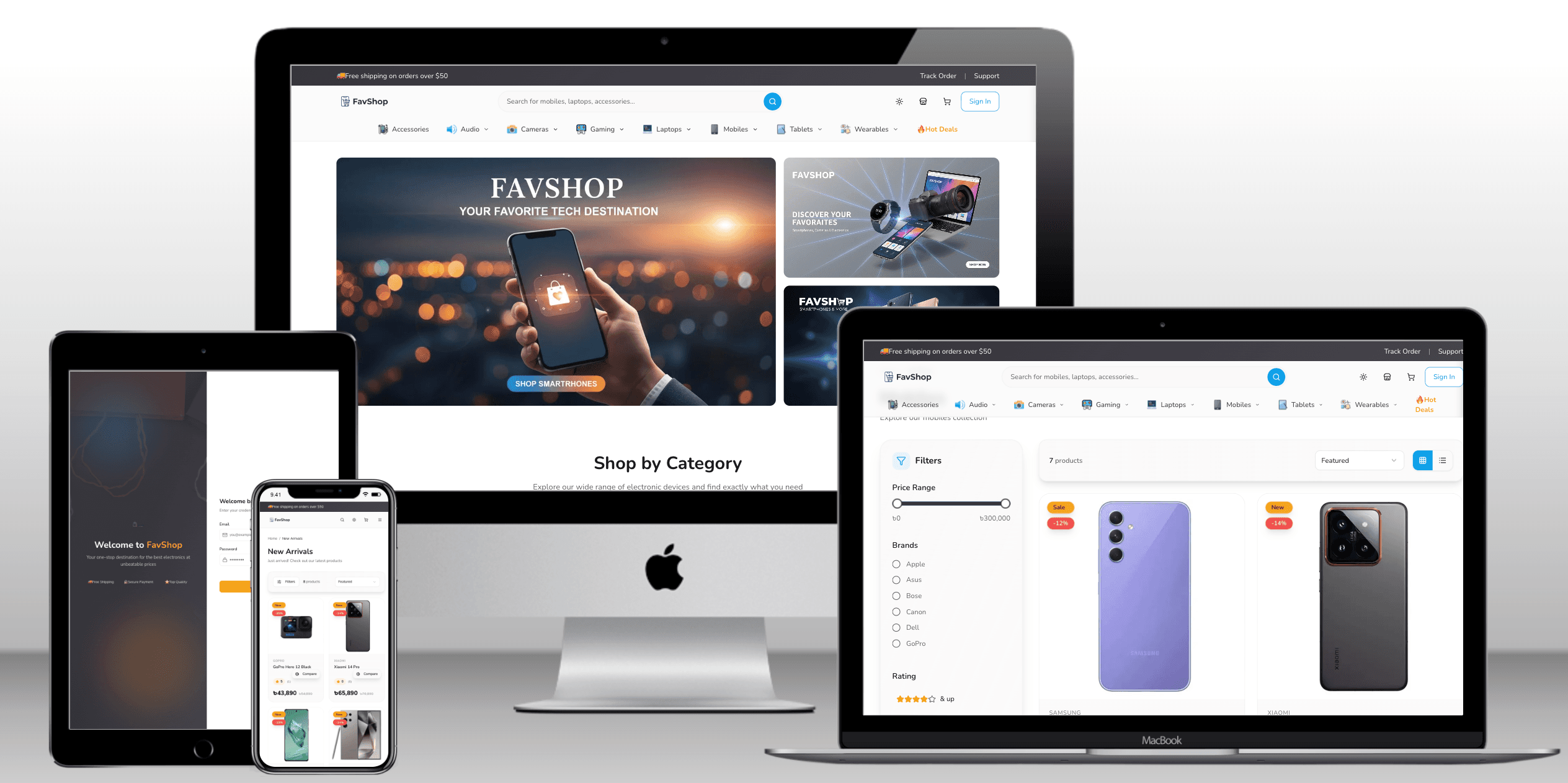
PublicThe website FavShop E-commerce is a modern online shopping platform designed to showcase and sell fashion products. It features a clean UI with sections like special offers, new arrivals, seasonal collections, and flash sales to highlight trending items and discounts. Users can browse a variety of products such as clothing for men, women, and kids, along with featured brands, ratings, and pricing information. The site emphasizes a smooth shopping experience with organized product categories, promotional deals, and customer-focused elements like recently viewed items and support details.
🛍️ FavShop - Modern E-Commerce Platform

A full-featured, modern e-commerce platform built with Next.js 16 and TypeScript




🌟 Features
🛒 Customer Features
-
Product Browsing & Search
- Live search with real-time suggestions
- Advanced filtering by category, subcategory, brand, price range
- Product variants (sizes, colors)
- Featured, top-selling, and new product sections
-
Shopping Experience
- Shopping cart with variant selection
- Wishlist functionality
- Guest checkout support
- User account with order history
- Product reviews and ratings
- Responsive design for all devices
-
Order Management
- Multiple shipping addresses
- Order tracking
- Order status updates (Pending, Confirmed, Processing, Shipped, Delivered)
- Guest and authenticated user orders
👨💼 Admin Features
-
Role-Based Access Control (RBAC)
- Custom admin roles with granular permissions
- Activity logging for all admin actions
- User management with role assignment
-
Product Management
- CRUD operations for products, categories, subcategories, brands
- Bulk product operations
- Product variant management (sizes, colors)
- Image upload with Cloudinary integration
- Stock management
- Featured/Top-selling/New product flags
-
Order Management
- Order status updates
- Order details view
- New order notifications
- Customer information management
-
Content Management
- Homepage banner management (Static, Carousel, Mixed layouts)
- Site logo management (Light/Dark theme support)
- Dynamic homepage content
-
Analytics & Reports
- Sales statistics
- Order analytics
- Product performance metrics
- User activity logs
-
Review Management
- Review moderation
- Verified purchase reviews
- Review approval/rejection
🚀 Tech Stack
Frontend




- React 19.2 - UI library
- Next.js 16.1 - React framework with App Router
- TypeScript - Type safety
- Tailwind CSS - Utility-first CSS framework
- Radix UI - Accessible component primitives
- Framer Motion - Animation library
- React Hook Form - Form management
- Zod - Schema validation
- TanStack Query - Data fetching and caching
- Lucide React - Icon library
Backend



- Next.js API Routes - RESTful API endpoints
- Prisma ORM - Database toolkit
- PostgreSQL - Primary database
- NextAuth.js v5 - Authentication
- bcryptjs - Password hashing
Cloud & Services


- Vercel - Hosting and deployment
- Cloudinary - Image storage and optimization
- Neon/Supabase - PostgreSQL hosting
UI Components & Libraries
- shadcn/ui - Re-usable component collection
- Recharts - Chart library for analytics
- Embla Carousel - Carousel component
- Sonner - Toast notifications
- TipTap - Rich text editor
- date-fns - Date utility library
📁 Project Structure
FavShop/
├── prisma/
│   ├── schema.prisma          # Database schema
│   └── migrations/            # Database migrations
├── public/
│   └── logo/                  # Brand assets
├── src/
│   ├── app/
│   │   ├── admin/            # Admin dashboard pages
│   │   ├── api/              # API routes
│   │   ├── (auth)/           # Authentication pages
│   │   └── (shop)/           # Customer-facing pages
│   ├── components/           # React components
│   ├── lib/                  # Utility functions
│   └── types/                # TypeScript types
├── .env                      # Environment variables
└── package.json
🔌 API Structure
Authentication
POST   /api/register              # User registration
POST   /api/auth/[...nextauth]    # NextAuth endpoints
POST   /api/logout                # User logout
Products
GET    /api/products              # Get all products (with filters)
GET    /api/products/[id]         # Get single product
POST   /api/admin/products        # Create product (Admin)
PUT    /api/admin/products/[id]   # Update product (Admin)
DELETE /api/admin/products/[id]   # Delete product (Admin)
POST   /api/admin/products/bulk-delete  # Bulk delete (Admin)
Categories & Brands
GET    /api/categories            # Get all categories
POST   /api/admin/categories      # Create category (Admin)
PUT    /api/admin/categories/[id] # Update category (Admin)
DELETE /api/admin/categories/[id] # Delete category (Admin)

GET    /api/brands                # Get all brands
POST   /api/admin/brands          # Create brand (Admin)
PUT    /api/admin/brands/[id]     # Update brand (Admin)
DELETE /api/admin/brands/[id]     # Delete brand (Admin)
Cart & Wishlist
GET    /api/cart                  # Get user cart
POST   /api/cart                  # Add to cart
PUT    /api/cart/[id]             # Update cart item
DELETE /api/cart/[id]             # Remove from cart

GET    /api/wishlist              # Get user wishlist
POST   /api/wishlist              # Add to wishlist
DELETE /api/wishlist/[id]         # Remove from wishlist
Orders
GET    /api/orders                # Get user orders
POST   /api/orders                # Create order
GET    /api/orders/[id]           # Get order details

GET    /api/admin/orders          # Get all orders (Admin)
PUT    /api/admin/orders/[id]     # Update order status (Admin)
GET    /api/admin/orders/new-count # Get new orders count (Admin)
Search
GET /api/search # Live product search
Admin - User & Role Management
GET    /api/admin/users           # Get all users
PUT    /api/admin/users/[id]      # Update user
DELETE /api/admin/users/[id]      # Delete user

GET    /api/admin/roles           # Get all roles
POST   /api/admin/roles           # Create role
PUT    /api/admin/roles/[id]      # Update role
DELETE /api/admin/roles/[id]      # Delete role

GET    /api/admin/permissions     # Get all permissions
GET    /api/admin/my-permissions  # Get current user permissions
Admin - Content Management
GET    /api/admin/homepage-banner # Get homepage banners
POST   /api/admin/homepage-banner # Create/Update banner
POST   /api/admin/homepage-banner/upload # Upload banner image

GET    /api/admin/logo            # Get site logo
POST   /api/admin/logo            # Update site logo
Admin - Analytics
GET    /api/admin/stats           # Get dashboard statistics
GET    /api/admin/activity-logs   # Get activity logs
Admin - Reviews
GET    /api/admin/reviews         # Get all reviews
PUT    /api/admin/reviews/[id]    # Update review
DELETE /api/admin/reviews/[id]    # Delete review
GET    /api/admin/reviews/new-count # Get new reviews count
File Upload
POST /api/upload # Upload images to Cloudinary
🗄️ Database Schema
Core Models
- User - User accounts with role-based access
- AdminRole - Custom admin roles
- Permission - Granular permissions
- RolePermission - Role-permission mapping
- ActivityLog - Admin action logging
Product Models
- Product - Product information
- Category - Product categories
- SubCategory - Product subcategories
- Brand - Product brands
- ProductImage - Product images
- ProductSpec - Product specifications
Shopping Models
- Cart - Shopping carts
- CartItem - Cart items with variants
- Wishlist - User wishlists
- WishlistItem - Wishlist items
- Order - Customer orders
- OrderItem - Order line items
- Address - Shipping/billing addresses
Content Models
- HomepageBanner - Homepage banner configuration
- BannerImage - Banner images
- SiteLogo - Site logo (light/dark themes)
Review Model
- Review - Product reviews and ratings
🚀 Getting Started
Prerequisites
- Node.js 20+
- PostgreSQL database
- Cloudinary account (for image uploads)
Installation
- Clone the repository
git clone https://github.com/yourusername/favshop.git
cd favshop
- Install dependencies
npm install
- Set up environment variables
cp .env.example .env
Edit .env with your configuration:
DATABASE_URL="postgresql://..."
DIRECT_URL="postgresql://..."
NEXTAUTH_SECRET="your-secret-key"
NEXTAUTH_URL="http://localhost:3002"
CLOUDINARY_CLOUD_NAME="your-cloud-name"
CLOUDINARY_API_KEY="your-api-key"
CLOUDINARY_API_SECRET="your-api-secret"
- Set up the database
npm run prisma:migrate
npm run prisma:generate
npm run seed:homepage
- Run the development server
npm run dev
Open http://localhost:3002 in your browser.
📜 Available Scripts
npm run dev              # Start development server (port 3002)
npm run dev:webpack      # Start dev server without Turbopack
npm run build            # Build for production
npm run start            # Start production server
npm run lint             # Run ESLint
npm run prisma:generate  # Generate Prisma client
npm run prisma:push      # Push schema to database
npm run prisma:studio    # Open Prisma Studio
npm run prisma:migrate   # Run database migrations
npm run seed:homepage    # Seed homepage permissions
🔐 Environment Variables
| Variable | Description |
|---|---|
DATABASE_URL | PostgreSQL connection string |
DIRECT_URL | Direct PostgreSQL connection (for migrations) |
NEXTAUTH_SECRET | NextAuth.js secret key |
NEXTAUTH_URL | Application URL |
CLOUDINARY_CLOUD_NAME | Cloudinary cloud name |
CLOUDINARY_API_KEY | Cloudinary API key |
CLOUDINARY_API_SECRET | Cloudinary API secret |
🎨 Key Features Implementation
Live Search
Real-time product search with debouncing and instant results display.
RBAC System
Granular permission system allowing custom admin roles with specific access rights to different resources (products, orders, users, etc.).
Guest Checkout
Customers can place orders without creating an account, with optional account creation after checkout.
Product Variants
Support for multiple product variants (sizes, colors) with independent stock management.
Homepage Management
Dynamic homepage with configurable banners (static, carousel, or mixed layouts) manageable from admin panel.
Activity Logging
Comprehensive logging of all admin actions for audit trails and security.
Responsive Design
Fully responsive design that works seamlessly on desktop, tablet, and mobile devices.
🤝 Contributing
Contributions are welcome! Please feel free to submit a Pull Request.
🔗 Links
- Live Demo: https://favshop-ecomm.vercel.app/
- Documentation: Coming soon
- Support: Open an issue on GitHub
Built with ❤️ using Next.js and TypeScript
⭐ Star this repo if you find it helpful!