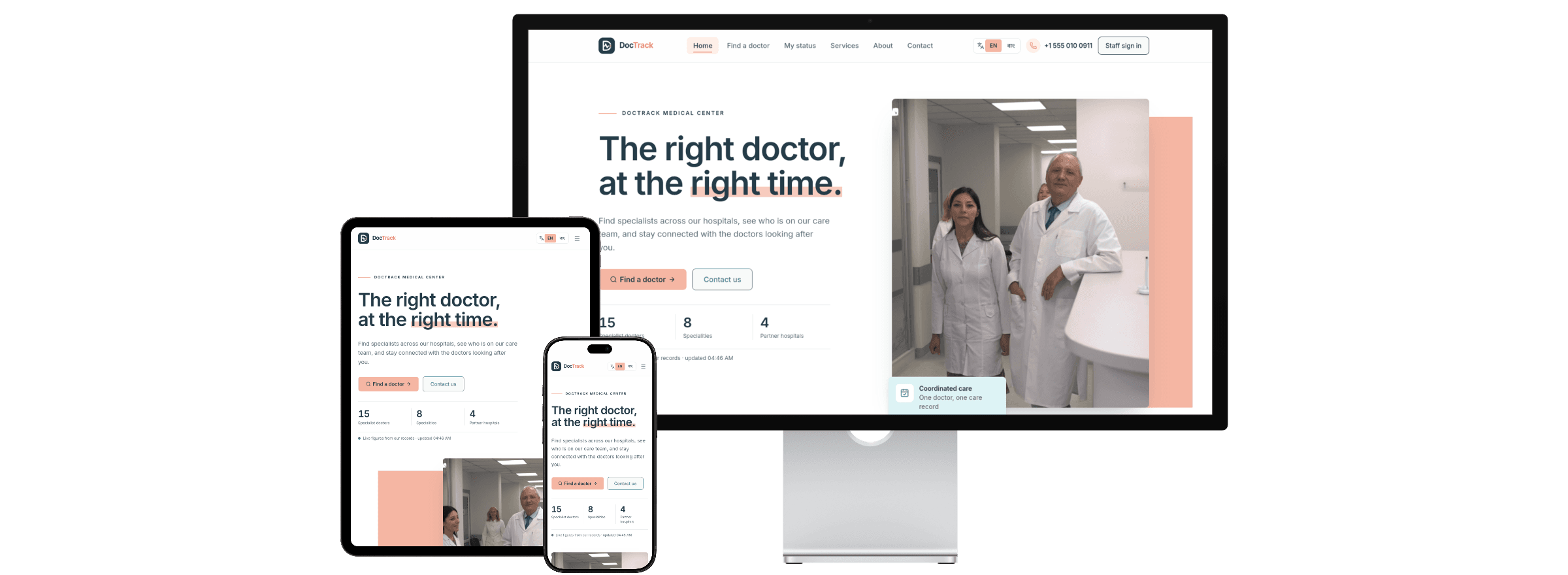
ehsan-0801/Doctor_Tracker
Public**DocTrack – Doctor & Patient Management System** DocTrack is a comprehensive healthcare management platform designed to streamline hospital operations. It enables administrators, doctors, management, and front-desk staff to manage doctors, patients, appointments-related workflows, and hospital activities through role-based dashboards. Key features include patient management, real-time staff tracking, live chat, notifications, analytics, audit logs, and a bilingual (English & Bangla) public website for finding doctors. Built with **Next.js, React, TypeScript, Node.js, Express, and MongoDB**.
DocTrack
DocTrack is a secure doctor and patient management platform for a hospital network. Administrators sign in to register doctors, add patients under a doctor, and browse every patient record with fast search, filters and pagination. A live dashboard, built on MongoDB aggregations, shows how patients are spread across doctors and how registrations change over time. Beyond the core admin portal, DocTrack gives management, front-desk staff and doctors their own role-based views, a real-time 3D map of where the care team is, instant chat with photo and file sharing, live notifications, a full audit log, and a public bilingual (English/Bangla) website where visitors can find a specialist.

Live demo: https://doctrackfast.vercel.app (API: https://doctor-tracker-99os.onrender.com). Sign in with the demo accounts. The API runs on Render's free tier, so the first request after a quiet period can take up to a minute.
Contents
- Features
- Requirement coverage
- Technology stack
- System architecture
- Technical decisions
- Setup guide
- REST API
- Testing
- Visual evidence
- Media credits
- Roadmap
Features
Core (assessment scope)
- Authentication: email and password sign-in with bcrypt-hashed passwords. Sessions are stored on the server and sent in an
httpOnlycookie. Sign-out revokes the session, sign-in is rate-limited, and every page and API route is protected. - Doctor management: create doctors (name, specialization, hospital, phone, email). Search, filter by specialization, hospital and created date, sort and paginate. Open a doctor to see their patients, add a patient under them, or remove a patient from their list.
- Patient management: a dedicated page lists every patient, with search, filters (condition, doctor including Unassigned, registration date), sorting and pagination. Patients can be edited (including reassignment) and deleted.
- Dashboard: total doctors, total patients, average patients per doctor, and new patients in the last 30 days compared with the previous 30. Charts show patients per doctor, monthly registrations (6, 12 or 24 months) and patients by condition, plus a list of recent patients.
- UX: responsive layout for desktop, tablet and mobile. Filters live in the URL, so they survive refresh and can be shared. Loading skeletons, empty and error states, toasts, keyboard support and accessible labels throughout.
Beyond the brief
- Roles: administrator, management, front-desk staff and doctor. Each role sees only the pages and data it is allowed to; a doctor sees only their own patients.
- Doctor profiles and public website: admins edit doctor profiles and photos (Cloudinary). The public site has a dynamic homepage, a find-a-doctor directory and doctor profile pages, in English and Bangla. Every portal header links to the website, and signed-in visitors see a Dashboard button on the website instead of Staff sign in.
- Live tracking: a real-time 3D hospital floor map (React Three Fiber) shows where doctors and staff are and their status (available, busy, in surgery, on break, off duty). Admins manage floors and rooms and can see 30 days of movement history.
- Real-time chat: one-to-one messages between doctors and their assigned staff; admins can message anyone. Includes unread counts, online status, emoji, and photo or document attachments up to 10 MB. Chat is available as a floating widget on every portal page.
- Notifications: a bell with an unread count, plus pop-ups for new messages, patient assignments, status changes made on your behalf, and staff assignments.
- Audit log (admin): every sign-in (including failed attempts), sign-out and change, with who, when, what changed, IP address and browser. Searchable and filterable, it updates live; secrets are never stored.
- Patient status check: the front desk issues each patient a unique access token (shown once, stored only as a SHA-256 hash). On the public
/check-statuspage, the patient enters their full name and token to see their current condition and assigned doctor. No account is needed. Failed checks are rate-limited, a wrong name and a wrong token get the same answer, and issuing a new token disables the old one. - Dark mode for the portal, and site settings that admins can edit without a deploy.
Requirement coverage
| Specification | Where it is implemented |
|---|---|
| 2.1 Only authenticated users; secure login; protected routes | backend/src/middleware/requireAuth.ts (session lookup and permission checks), backend/src/services/auth.service.ts (bcrypt, hashed session tokens), frontend/src/proxy.ts (redirects signed-out visitors) |
| 2.2 Doctors: create, list, search, date and other filters, pagination | /doctors page; GET/POST /api/doctors with search, specialization, hospital, startDate, endDate, page, limit |
| 2.2 A doctor's patients: view, add, remove | /doctors/[id]; GET/POST /api/doctors/:id/patients, DELETE /api/doctors/:id/patients/:patientId |
| 2.3 Patients page: list, edit, delete, pagination, search, filters (date, condition, doctor) | /patients; GET/PATCH/DELETE /api/patients |
| 3 Dashboard: totals, patients per doctor, date-based statistics, charts | /dashboard (Recharts); aggregation pipelines in backend/src/services/dashboard.service.ts |
| 4 Modern, responsive UI; clear navigation between Dashboard, Doctors and Patients | Sidebar (desktop), drawer (mobile), breadcrumbs, screenshots below |
| 5 Indexed queries for search, filtering and pagination; validation and error handling | Indexes; Zod validators in backend/src/validators; central error handler |
| 6 Next.js frontend, separate Express backend, MongoDB, REST | frontend/, backend/, MongoDB Atlas; REST API |
| 6 State management and data fetching | TanStack Query cache plus URL-synced filter state (decision 3) |
| README template | This document: description, setup guide with .env.example, architecture, technical decisions, desktop and mobile screenshots |
Technology stack
| Layer | Technology |
|---|---|
| Frontend | Next.js 16 (App Router, Cache Components), React 19, TypeScript |
| Styling / UI | Tailwind CSS 4, shadcn/ui (Radix), Lucide icons, Inter and Anek Bangla fonts |
| Data fetching and state | TanStack Query, URL search params |
| Forms / validation | React Hook Form, Zod |
| Charts / 3D | Recharts, three.js with React Three Fiber and drei |
| Real time | Socket.IO (server and client) |
| Backend | Node.js 22, Express 5, TypeScript |
| Database | MongoDB Atlas, Mongoose 9 |
| Media | Cloudinary (signed direct uploads) |
| Security | bcryptjs, helmet, express-rate-limit, cookie-parser, CORS |
| Testing | Vitest, Supertest, mongodb-memory-server, Playwright |
System architecture
                       ┌──────────────────────────── Next.js frontend (:3000) ───────────────────────────┐
Browser ──── HTTPS ───►│ public site · portal pages · TanStack Query · proxy.ts (signed-out → /login)    │
   │                   │ /api/*  ── same-origin rewrite ──────────────────────────────┐                  │
   │                   └──────────────────────────────────────────────────────────────┼──────────────────┘
   │                                                                                  ▼
   │  WebSocket (Socket.IO, short-lived token)      ┌──────────── Express API (:4000) ────────────────────┐
   └───────────────────────────────────────────────►│ routes → controllers → services → Mongoose models   │
   │                                                │ requireAuth + capability checks · Zod validation    │
   │                                                │ realtime server: rooms per user, presence feeds     │
   │                                                └───────────────┬────────────────────────┬────────────┘
   │  direct upload (server-signed)                                 ▼                        ▼
   └──────────────────────────────────────────► Cloudinary    MongoDB Atlas (doctor_tracker)
                                                (photos, chat files)
Data flow
- Reading data. A page reads its filters from the URL (
?search=…&condition=…&page=2), so filters survive refresh and back/forward navigation and can be shared. TanStack Query calls/api/...on the same origin, and Next.js rewrites the request to Express. The session cookie stays first-party and the browser never makes a cross-origin call. - On the server. Express looks up the session (
requireAuth), checks the capability the route needs (for examplepatients:write), validates the input with Zod and calls a service. Services also scope data per user: a doctor only ever receives their own patients. The service runs an indexed query (filter → sort → skip/limit, with acountDocumentsin parallel) or an aggregation pipeline. It returns{ success, message, data, pagination }. - Writing data. After a change, the client invalidates the affected query groups (patients, doctors, dashboard), so every count on screen stays consistent. The API also writes an audit entry and notifies the people affected.
- Real time. The browser fetches a 2-minute signed token from
/api/realtime/tokenand opens a Socket.IO connection straight to the API. Vercel rewrites cannot proxy WebSockets. Each user joins their own room; status updates, chat messages, notifications and audit entries arrive as events. These events update the TanStack Query cache in place instead of polling. - Media. For a doctor photo or chat attachment, the API returns an upload signature locked to one Cloudinary folder. The browser then uploads the file directly, so the API secret never leaves the server. For chat, the API saves an attachment only if its URL is in that conversation's folder and has an allowed format.
Roles and permissions
Routes check a capability, never a role name; the map lives in backend/src/constants/roles.ts and is mirrored in frontend/src/lib/permissions.ts for navigation.
| Capability | Admin | Management | Staff | Doctor |
|---|---|---|---|---|
| Dashboard, doctors and patients (read) | ✓ | ✓ | ✓ | own patients only |
| Create / edit patients, assign to doctors | ✓ | ✓ | ||
| Delete patients | ✓ | |||
| Create / edit doctors, upload photos | ✓ | |||
| Users, site settings, rooms, audit log, full tracking history | ✓ | |||
| Live tracking, chat, notifications | ✓ | ✓ | ✓ | ✓ |
Staff and management update the status of, and chat with, only the doctors they are assigned to.
Folder structure
doctor-tracker/
├── backend/                         Express REST API + Socket.IO
│   └── src/
│       ├── config/                  env validation, database, Cloudinary signing
│       ├── constants/               roles & permissions, session settings, conditions, chat rules
│       ├── controllers/             HTTP layer: parse input, call services, send responses
│       ├── middleware/              requireAuth / requirePermission, error handler
│       ├── models/                  User, Session, Doctor, Patient, Location, Presence,
│       │                            Conversation/Message, Notification, AuditEvent, SiteSettings
│       ├── realtime/                Socket.IO server, token signing, rooms
│       ├── routes/                  auth, public, doctors, patients, dashboard, users, settings,
│       │                            uploads, realtime, locations, presence, chat, audit, notifications
│       ├── services/                business logic and database queries
│       ├── validators/              Zod schemas for bodies, params and query strings
│       ├── utils/                   ApiError, response helpers, query helpers
│       └── scripts/                 seed, Cloudinary setup
│   └── tests/                       Vitest + Supertest integration tests
├── frontend/                        Next.js application
│   ├── e2e/                         Playwright tests
│   └── src/
│       ├── app/(site)/              public homepage, find-a-doctor, doctor profiles
│       ├── app/(auth)/login         sign-in
│       ├── app/(dashboard)/         dashboard, doctors, patients, doctor, tracking, messages,
│       │                            locations, users, settings, audit
│       ├── components/              ui (shadcn), shared (table, filters, states), layout, feature folders
│       ├── hooks/                   URL-synced filters, session, debounce, unread count
│       ├── lib/                     API client and endpoints, query keys, permissions, realtime provider
│       ├── types/                   API types
│       └── proxy.ts                 optimistic auth redirect
├── docs/screenshots/
└── project-docs/                    specification, product plan, roadmap
Data model and indexes
User          { name, email (unique), passwordHash, role, doctorId → Doctor (doctor accounts),
                assignedDoctorIds → Doctor[] (staff/management), photoUrl, active, lastLoginAt }
Session       { tokenHash (unique), userId → User, expiresAt (TTL) }
Doctor        { name, specialization, hospital, phone, email (unique), qualifications, photoUrl }
Patient       { name, condition, doctorId → Doctor | null }
Location      { name, code (unique), type, floor, x, y, w, h, active }
Presence      { userId (unique), locationId → Location, status, note, updatedBy }   + PresenceEvent history (TTL 30 days)
Conversation  { key (unique pair), participants, lastMessage, lastMessageAt, reads[] }
Message       { conversationId, senderId, body, attachment? { kind, url, name, size, width, height } }
Notification  { userId, type, title, body, link, read }                               (TTL 90 days)
AuditEvent    { action, actor, entityType, entityId, entityLabel, changes, ip, userAgent } (TTL 180 days)
SiteSettings  { homepage, services, announcements, contact (EN + BN) }
All models have createdAt/updatedAt. A patient belongs to at most one doctor. Removing a patient from a doctor sets doctorId to null: the record stays in the patient list as Unassigned and can be reassigned by editing it. Every doctor reference is checked before it is written.
Indexes are chosen from the actual queries:
| Collection | Index | Used by |
|---|---|---|
| doctors | { email: 1 } unique | duplicate protection |
| doctors | { createdAt: -1, _id: -1 } | default listing order, created-date filter |
| doctors | { specialization: 1, createdAt: -1 }, { hospital: 1, createdAt: -1 } | filtered listings, filter options (distinct) |
| patients | { createdAt: -1, _id: -1 } | patient list, date filter, registration trend |
| patients | { doctorId: 1, createdAt: -1 } | a doctor's patients, patient counts, patients per doctor |
| patients | { condition: 1, createdAt: -1 } | condition filter, condition distribution |
| patients | { condition: 1 } (case-insensitive collation) | canonical-condition lookup |
| users | { email: 1 } unique, { role: 1, createdAt: -1 }, { assignedDoctorIds: 1 }, { doctorId: 1 } unique (partial) | sign-in, user list, staff for a doctor, one account per doctor |
| sessions | { tokenHash: 1 } unique, { userId: 1 }, { expiresAt: 1 } TTL | session lookup, revoke on deactivate, automatic expiry |
| presences / presenceevents | { userId: 1 } unique, { locationId: 1 }; { userId: 1, createdAt: -1 }, TTL | live map, room clean-up, movement history |
| conversations / messages | { key: 1 } unique, { participants: 1, lastMessageAt: -1 }; { conversationId: 1, createdAt: -1, _id: -1 } | inbox, paginated threads, unread counts |
| notifications | { userId: 1, createdAt: -1 }, { userId: 1, read: 1 }, TTL | bell list, unread count |
| audit_events | { createdAt: -1, _id: -1 }, { actorId / entityType / action: 1, createdAt: -1 }, TTL | audit list and filters |
Technical decisions
1. Separate Express API behind a same-origin Next.js rewrite
Context. The specification requires a Next.js client and a standalone Node.js + Express server. Running them on different domains usually means cross-origin cookies: SameSite=None, third-party cookie blocking in Safari and Chrome, and CORS preflights on every request.
Decision. The browser never calls Express directly for REST. Next.js rewrites /api/* to the API (API_URL), so the session cookie is first-party with SameSite=Lax, and the frontend keeps no tokens in JavaScript. Express keeps a strict routes → controllers → services → models split, so the HTTP layer, the business rules and the database queries can each be read and tested on their own.
Trade-offs. Each request makes one extra hop through the Next.js server, which is small next to the database round trip. WebSockets cannot pass through Vercel rewrites, so real time is the one exception. The browser connects to the API directly, authenticated by a 2-minute HMAC token issued over the same-origin REST path, so the long-lived session cookie still never crosses origins.
2. Server-side sessions instead of JWTs
Context. This is an admin portal handling patient data. Revoking access immediately, on sign-out, account deactivation or password reset, matters more than avoiding a database read.
Decision. On sign-in the API creates a random 256-bit token, stores only its SHA-256 hash in sessions, and sends the token in an httpOnly cookie. Each private request looks the session up by its indexed hash and loads the current user, role and assignments. Sign-out deletes the session. Deactivating a user or resetting a password deletes all of that user's sessions, so a stolen or old cookie stops working at once. A stateless JWT could not do that without a deny-list. A TTL index removes expired sessions automatically.
Trade-offs. One indexed read per request, which is acceptable here and cheaper than a JWT deny-list lookup. Sign-in is rate-limited, and unknown emails still run a bcrypt comparison, so response times do not reveal which accounts exist.
3. TanStack Query and the URL as the state layer
There is no Redux or global store. Server data lives in the TanStack Query cache, keyed by a central query-keys.ts. Filters, search and the current page live in the URL through one useUrlFilters hook. Mutations invalidate whole query groups, so the dashboard, doctor counts and patient lists stay consistent. Real-time events patch the cache directly, so the chat preview and status badges update without refetching everything. This avoids duplicating server state on the client and limits re-renders to the components that read the changed data.
4. Statistics computed in the database
Totals use countDocuments. Patients per doctor, monthly registrations and condition distribution are aggregation pipelines that return only the small result set. The server fills in empty months. The doctor list gets its patient counts from one $group over the doctors on the current page, not one query per doctor. No endpoint loads a whole collection.
5. Hybrid condition field
Conditions are chosen from a preset list or typed freely. On save they are canonicalized: a case-insensitive match against the preset list first, then an existing stored spelling, otherwise the input in title case. "diabetes", "Diabetes " and "DIABETES" are stored once, which keeps the condition filter and chart clean without limiting staff to a fixed list.
6. Search approach
Search uses an escaped, case-insensitive regular expression, which supports partial matches ("amel" finds "Amelia"). It is always combined with indexed filters and pagination. For very large data sets the next step is MongoDB Atlas Search; at this scale regex search is simpler and fast enough.
Setup guide
Requirements
- Node.js 22.9 or newer (uses
--env-file-if-exists) - npm 10+
- A MongoDB Atlas cluster (the free tier is enough) or a local MongoDB 7+
- Optional: a Cloudinary account (photo uploads and chat attachments)
1. MongoDB Atlas
- Create a cluster and a database user with read/write access.
- In Security → Database & Network Access → IP Access List, add your IP address. Hosted backends also need the host's outbound IPs, or
0.0.0.0/0. - Copy the connection string and add the database name
doctor_tracker:mongodb+srv://<user>:<password>@<cluster>.mongodb.net/doctor_tracker?retryWrites=true&w=majority
The seed script creates the collections and indexes.
2. Backend
cd backend
npm install
cp .env.example .env        # then fill in the values below
npm run seed                # indexes, admin account, demo data
npm run dev                 # http://localhost:4000
backend/.env.example:
| Variable | Description |
|---|---|
PORT | API port (default 4000) |
NODE_ENV | development or production (production enables Secure cookies and trust proxy) |
CLIENT_ORIGIN | Frontend origin allowed by CORS and WebSockets (default http://localhost:3000) |
MONGODB_URI | MongoDB connection string including /doctor_tracker |
ADMIN_EMAIL | Administrator email created by npm run seed |
ADMIN_PASSWORD | Administrator password (at least 8 characters), used only by the seed; demo accounts share it |
REALTIME_SECRET | Recommended in production (32+ characters). Signs the 2-minute WebSocket tokens. |
CLOUDINARY_URL | Optional. cloudinary://<api_key>:<api_secret>@<cloud_name> enables photo uploads and chat attachments (folders DocTrack/doctors, DocTrack/staff, DocTrack/site, DocTrack/chat/<conversationId>). Run npm run cloudinary:setup to check the credentials. |
Seed options:
npm run seed                     # admin (if missing) + demo data (only if there are no doctors)
npm run seed -- --admin-only     # admin only
npm run seed -- --tracking-only  # rooms, live statuses, staff assignments, sample chats (keeps doctors/patients)
npm run seed -- --reset          # deletes ALL doctors and patients, re-creates demo data, resets the admin password
Without --reset the seed never overwrites the password of an existing admin.
3. Frontend
cd frontend
npm install
cp .env.example .env.local
npm run dev                      # http://localhost:3000
frontend/.env.example:
| Variable | Description |
|---|---|
API_URL | Origin of the Express API, used by the server-side /api rewrite (default http://localhost:4000) |
NEXT_PUBLIC_REALTIME_URL | Public origin of the Express API for WebSockets. Local default: http://<host>:4000. |
Open http://localhost:3000, choose Staff sign in and use ADMIN_EMAIL / ADMIN_PASSWORD.
Demo accounts
The seed creates 15 doctors, 60 patients, rooms on two floors, live statuses and sample conversations. Every demo account uses the ADMIN_PASSWORD given to the seed.
Credentials on the live demo:
| Role | Password | Lands on | |
|---|---|---|---|
| Administrator | admin@doctortracker.com | Admin1234 | /dashboard (full access) |
| Management | management@doctortracker.com | Admin1234 | /dashboard (read-only) |
| Front desk (staff) | staff@doctortracker.com | Admin1234 | /dashboard (patients, assignments) |
| Doctor | amelia.hart@example.com (every seeded doctor signs in with their own email) | Admin1234 | /doctor (own patients only) |
These are demo-only credentials for fictional data. For your own installation, the administrator is the ADMIN_EMAIL / ADMIN_PASSWORD you set.
The seed also gives one patient the status-check token DEMO-CARE-2026 and prints that patient's name. Use both on /check-status.
Commands
| Location | Command | Purpose |
|---|---|---|
| backend | npm run dev | API with reload |
| backend | npm run build && npm start | compile to dist/ and run in production mode |
| backend | npm run typecheck | TypeScript check |
| backend | npm test | API integration tests |
| frontend | npm run dev | Next.js development server |
| frontend | npm run build && npm start | production build and server |
| frontend | npm run lint | ESLint |
| frontend | npm run test:e2e | Playwright end-to-end tests (needs E2E_MONGODB_URI) |
Deployment
- Backend (Render, Railway, Fly.io…):
npm run build/npm start,NODE_ENV=production, the variables above,CLIENT_ORIGINset to the frontend URL, and aREALTIME_SECRET. Add the host to the Atlas IP access list. - Frontend (Vercel):
API_URLandNEXT_PUBLIC_REALTIME_URL, both set to the public API origin. - REST traffic goes through the frontend's own
/apipath, so the session cookie stays first-party even when the two services run on different domains.
REST API
All responses use one shape:
{ "success": true, "message": "Patients retrieved successfully", "data": [], "pagination": { "page": 1, "limit": 10, "total": 0, "totalPages": 0 } }
Errors use { "success": false, "message": "...", "errors": [{ "field": "email", "message": "..." }] }. Status codes: 400 (validation, malformed id), 401 (no or expired session), 403 (role not allowed), 404, 409 (duplicate), 429 (too many sign-in attempts) and 503 (uploads not configured). Every route except /api/health, /api/auth/login|logout and /api/public/* requires a session.
| Method | Endpoint | Description |
|---|---|---|
| POST | /api/auth/login | Sign in (email, password); sets the session cookie |
| POST | /api/auth/logout | Revoke the session and clear the cookie |
| GET | /api/auth/session | Current user (name, role, doctor and assignments) |
| GET | /api/doctors | Paginated doctors. Query: page, limit (≤100), search, specialization, hospital, startDate, endDate (YYYY-MM-DD), sortBy (createdAt/name), sortOrder |
| POST | /api/doctors | Create doctor (name, specialization, hospital, phone, email) (admin) |
| PATCH | /api/doctors/:id | Update doctor profile and photo (admin) |
| GET | /api/doctors/filters | Distinct specializations and hospitals |
| GET | /api/doctors/options | Bounded doctor search for pickers (search, limit ≤50) |
| GET | /api/doctors/:id | Doctor details with patient count |
| GET | /api/doctors/:id/patients | The doctor's patients (same query parameters as /api/patients) |
| POST | /api/doctors/:id/patients | Create a patient under the doctor (name, condition) |
| DELETE | /api/doctors/:id/patients/:patientId | Remove the association (patient kept as unassigned) |
| GET | /api/patients | Paginated patients. Query: page, limit, search, condition, doctorId (id or unassigned), startDate, endDate, sortBy, sortOrder |
| POST | /api/patients | Create patient (name, condition, doctorId) |
| GET | /api/patients/conditions | Preset and stored conditions |
| GET | /api/patients/:id | Patient details |
| PATCH | /api/patients/:id | Update name, condition and/or doctorId |
| DELETE | /api/patients/:id | Delete patient (admin) |
| POST / DELETE | /api/patients/:id/access-token | Issue (returned once) or revoke a patient's status-check token (admin, staff) |
| GET | /api/dashboard/stats | Totals, average per doctor, 30-day counts |
| GET | /api/dashboard/patients-per-doctor | Top doctors by patient count (limit) |
| GET | /api/dashboard/registrations | Patients created per month (months ≤36) |
| GET | /api/dashboard/conditions | Patients per condition, top N plus "Other" (limit) |
| GET / POST | /api/users | List / create portal users (admin) |
| PATCH | /api/users/:id | Update role, assignments, active state (admin) |
| POST | /api/users/:id/reset-password | Set a new password and revoke the user's sessions (admin) |
| GET / PUT | /api/settings | Read / update public site settings (admin) |
| GET | /api/public/site, /api/public/doctors, /api/public/doctors/:id | Public website data (no session) |
| POST | /api/public/patient-status | A patient's current condition and doctor for a matching name and token (no session; 10 failed attempts per 15 minutes) |
| POST | /api/uploads/signature | Signed Cloudinary upload for photos (admin) |
| GET | /api/realtime/token | 2-minute WebSocket token |
| GET | /api/locations | Rooms and floors |
| POST / PATCH / DELETE | /api/locations, /api/locations/:id | Manage rooms (admin) |
| GET | /api/presence | Live status of the people the user may see |
| PUT | /api/presence/:userId | Set location and status (self, assigned staff, or admin) |
| GET | /api/presence/:userId/history | 30-day movement history (admin) |
| GET | /api/chat/contacts | People the user may message |
| GET / POST | /api/chat/conversations | Conversations with unread counts / open a conversation (userId) |
| GET | /api/chat/conversations/:id/messages | Paginated messages (before, limit) |
| POST | /api/chat/conversations/:id/messages | Send a message (body and/or attachment) |
| POST | /api/chat/conversations/:id/read | Mark the conversation read |
| POST | /api/chat/conversations/:id/attachments/signature | Signed upload for a photo or document (participants only) |
| GET | /api/notifications | The user's notifications with unread count (limit, before) |
| POST | /api/notifications/:id/read, /api/notifications/read-all | Mark notifications read |
| GET | /api/audit, /api/audit/facets | Audit entries with filters / available actions and areas (admin) |
Date statistics always use the record's createdAt (registration date).
WebSocket events (Socket.IO): presence:update, chat:message, chat:read, user:online, notification:new, audit:new.
Testing
Backend (Vitest + Supertest)
cd backend
npm test
98 integration tests run against an in-memory MongoDB (mongodb-memory-server), so they need no Atlas access and never touch real data. They cover:
- Authentication: validation, generic errors, httpOnly cookie, hashed session tokens, logout revocation, expired sessions.
- Role access for every capability.
- Doctors: create, duplicates, regex-escaped search, filters, date ranges, sorting, pagination, patient counts, invalid ids, profile updates.
- Patients: doctor association, unassign without delete, condition canonicalization, filters, reassignment, invalid references, NoSQL-operator injection.
- Dashboard aggregations.
- Rooms and live status: scoping and history.
- Chat: permissions, unread counts, attachment signing and forged-URL rejection.
- Real-time delivery over a real WebSocket.
- Audit log: recorded actions, secret redaction, admin-only access.
- Notifications.
- Patient status tokens: hashed storage, name and token matching, identical errors, replacement and revocation, role access.
End-to-end (Playwright)
cd frontend
npx playwright install chromium        # once (or set PLAYWRIGHT_CHANNEL=chrome to use installed Chrome)
E2E_MONGODB_URI="mongodb+srv://…/doctor_tracker_e2e?retryWrites=true&w=majority" npm run test:e2e
20 browser tests (desktop 1440×900 and mobile 375×812) start the real API (port 4100) and a production build of the frontend (port 3100). The run resets and seeds the database in E2E_MONGODB_URI, so it refuses any database whose name does not contain e2e or test. Covered flows:
- Sign-in: redirects and errors, password visibility, sign-out, links between the portal and the public website.
- Dashboard: totals and period selector.
- Doctors: search, sort, filter, pagination, add with duplicate handling, details with breadcrumbs.
- Patients: the full lifecycle (add, remove from doctor, reassign, edit, delete) and URL-driven filters.
- Mobile: card lists, the navigation drawer and filters.
- Audit log and a live notification delivered to a second signed-in user.
- Chat: emoji, photo and document messages (Cloudinary is stubbed in the browser), and the chat widget across pages.
- Patient status: staff issue a token, and a signed-out patient checks their condition with it.
Visual evidence
Captured from a production build with the seeded demo data.
Desktop (1440 × 900)
| Dashboard | Doctors |
|---|---|
|  |
| Doctor details and patients | Patients |
|---|---|
 |  |
| Add patient | Doctor portal |
|---|---|
 |  |
| Live tracking (3D map) | Messages |
|---|---|
 |  |
| Chat widget | Notifications |
|---|---|
 |  |
| Audit log | Dark mode |
|---|---|
 |  |
| Public homepage | Find a doctor |
|---|---|
 |  |
| Sign in |
|---|
 |
Mobile (390 × 844)
| Dashboard | Doctors | Patients |
|---|---|---|
 |  |  |
| Navigation drawer | Live tracking | Messages |
|---|---|---|
 |  |  |
| Public homepage |
|---|
 |
Media credits
Demo staff portraits in backend/seed-assets/photos are from Unsplash under the Unsplash License; photographers are listed in seed-assets/photos/CREDITS.txt. The people shown are stock models presented as fictional demo doctors and staff. With a valid CLOUDINARY_URL, the seed uploads them to DocTrack/doctors and DocTrack/staff.
The hero and About videos (and their poster frames) are from Mixkit under the Mixkit Stock Video Free License (commercial use allowed): "Clinic staff at a hospital reception" (#4766) and "Doctor wearing mask and gloves for protection" (#4745). The DocTrack logo and favicon are original SVGs in this repository.
Roadmap
DocTrack is built for a single hospital organization; it is not multi-tenant. Doctor deletion is intentionally not offered, because patient records, user accounts and chat history reference doctors.
Planned next steps:
- Patient portal: extend the status check into a full patient view with history and live updates.
- Condition timeline: a dated history of each patient's condition, written by their doctor and visible to the patient.
- Appointments: booking from the public doctor profile or the front desk, with availability that follows the doctor's live status.
- Exports: CSV/PDF for patient and doctor lists, the audit log and dashboard reports, plus chart drill-down into filtered lists.
- Account security: self-service password change, active-session management and optional two-factor sign-in for admins.